-
Type:
Bug
-
Resolution: Unresolved
-
Priority:
 Low
Low
-
None
-
Affects Version/s: 8.14.0, 8.20.0, 9.0.0, 9.4.0, 9.12.0, 10.0.0, 10.3.8
-
Component/s: Personal Access Tokens
-
8.14
-
2
-
Severity 3 - Minor
-
0
Issue Summary
When trying to authenticate a REST API request with wrong credentials through basic authentication, Jira properly respond with a 401 HTTP response status.
The same behavior would be expected when using personal access tokens.
If a wrong, nonexistent token is used, Jira doesn't respond with 401 HTTP status, but passes the request as an anonymous user.
Note that regular product permissions is still followed and the results will only show data that an anonymous user would have access to.
Steps to Reproduce
- Create a vanilla instance of Jira Software Data Center.
- This was validated on Jira version 9.12 and 10.0.
- Create a sample project with a couple of issues.
- Create a regular user with access to the sample project.
- Try accessing the following REST API using the correct credentials for the sample user.
JIRA_BASE_URL=http://127.0.0.1:8080
JIRA_USR_NAME=user001
JIRA_USR_PWD=user001

curl -v -o /dev/null \
  -u ${JIRA_USR_NAME}:${JIRA_USR_PWD} \
  ${JIRA_BASE_URL}'/rest/api/2/search?jql=key%3DSCRUM-10'
-
- Note authentication works as expected and the 200 HTTP response status.
- Try accessing the same REST API using the wrong credentials as below.
JIRA_BASE_URL=http://127.0.0.1:8080
JIRA_USR_NAME=user001
JIRA_USR_PWD=not_my_password

curl -v -o /dev/null \
  -u ${JIRA_USR_NAME}:${JIRA_USR_PWD} \
  ${JIRA_BASE_URL}'/rest/api/2/search?jql=key%3DSCRUM-10'
-
- Note authentication failed and the 401 HTTP response status.
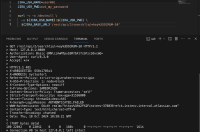
- Note authentication failed and the 401 HTTP response status.

- Create a personal access token (PAT) to the sample user.
- Try accessing the same REST API using the correct PAT.
JIRA_BASE_URL=http://127.0.0.1:8080

curl -v -o /dev/null \
  -H 'Authorization: Bearer NDA5NjMwNzc2Mjc1OmaU1XKiZsA+HTkq6W6pAdcyg3qW' \
  ${JIRA_BASE_URL}'/rest/api/2/search?jql=key%3DSCRUM-10'
-
- Note authentication works as expected and the 200 HTTP response status.
- Try accessing the same REST API using the wrong credentials as below.
JIRA_BASE_URL=http://127.0.0.1:8080

curl -v -o /dev/null \
  -H 'Authorization: Bearer not_my_token' \
  ${JIRA_BASE_URL}'/rest/api/2/search?jql=key%3DSCRUM-10'
Expected Results
The request is not authorized as it's using a nonexistent token and Jira responds the request with a 401 HTTP status.
Actual Results
The request is fulfilled with a 200 HTTP response status.
Since the used PAT doesn't exist, the request is made as anonymous.

Workaround
- When using PAT, refer to the X-AUSERNAME response header to ensure the authentication worked with the expected user.
- Use a reverse proxy or Tomcat's urlrewrite.xml to block or redirect access to this endpoint


- split to
-
-
- Gathering Impact
-