-
Type:
Bug
-
Resolution: Fixed
-
Priority:
 Medium
-
Affects Version/s: 9.15.2, 9.16.1, 9.17.3, 9.17.4, 10.1.1, 10.3.1, 10.3.2, 10.3.5
-
Component/s: Rate Limiting
-
9.15
-
24
-
Severity 2 - Major
-
49
Issue Summary
After configuring and enabling rate limiting, as soon as a user reaches the maximum number of requests allowed, we can see the error "Rate limiting might not be working properly" when visiting the Rate Limiting page again, and the list of users who were "rate limited" is empty.
This was noticed to happen when using MS SQL server 2017 and 2019.
This is reproducible on Data Center: yes
Steps to Reproduce
- Spin up a Jira instance, connected to a SQL Server 2017 or 2019 database
- Configure the Rate Limiting as follows:
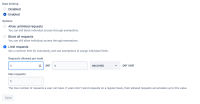

- Use the following curl (or something similar) to trigger the Rate Limiting:
for i in $(seq 100); do curl -v -u username:password https://<jira-base-url>/rest/api/2/myself ; done
Expected Results
The Rate Limiting page has no errors, and the list of users who were rated limited is populated.
Actual Results
In the UI, we can see the following error in the "Rate Limiting" page:
 |
The below exception is thrown in the atlassian-jira.log file:
2024-06-25 14:05:32,200+0000 http-nio-8080-exec-2 url: /jira/rest/rate-limiting/latest/admin/rate-limit/history/; user: admin DEBUG admin 845x792x1 1yq9jho 172.29.224.229,172.50.0.3 /rest/rate-limiting/latest/admin/rate-limit/history/ [c.a.r.rest.resource.RateLimitingExceptionMapper] Caught unknown exception:
com.querydsl.core.QueryException: Caught SQLServerException for select "AO_AC3877_RL_USER_COUNTER"."USER_ID", sum("AO_AC3877_RL_USER_COUNTER"."REJECT_COUNT"), max("AO_AC3877_RL_USER_COUNTER"."INTERVAL_START"), "AO_AC3877_USER_RL_SETTINGS"."USER_ID" is not null from "dbo"."AO_AC3877_RL_USER_COUNTER" "AO_AC3877_RL_USER_COUNTER" left join "dbo"."AO_AC3877_USER_RL_SETTINGS" "AO_AC3877_USER_RL_SETTINGS" on "AO_AC3877_RL_USER_COUNTER"."USER_ID" = "AO_AC3877_USER_RL_SETTINGS"."USER_ID" group by "AO_AC3877_RL_USER_COUNTER"."USER_ID", "AO_AC3877_USER_RL_SETTINGS"."USER_ID" order by sum("AO_AC3877_RL_USER_COUNTER"."REJECT_COUNT") desc offset ? rows fetch next ? rows only
	at com.querydsl.sql.DefaultSQLExceptionTranslator.translate(DefaultSQLExceptionTranslator.java:50)
...
Caused by: com.microsoft.sqlserver.jdbc.SQLServerException: Incorrect syntax near the keyword 'is'.
Due to that, application admins are unable to monitor which users are triggering the rate limiting, as the list of users is empty:
 |
Workaround
Since the Bug prevents viewing the list of users who have been rate-limited from the UI, the following SQL statement can be used as a workaround to identify the list of users who have been Rate-Limited and whether they have already been added to the Exemptions List.
SELECT
    RL_COUNTER.USER_ID,
    um.username,
    SUM(RL_COUNTER.REJECT_COUNT) AS TOTAL_REJECTS,
    MAX(RL_COUNTER.INTERVAL_START) AS LAST_INTERVAL,
    CASE
        WHEN RL_SETTINGS.USER_ID IS NOT NULL THEN 'RATE_LIMITED_BUT_EXEMPTED'
        ELSE 'RATE_LIMITED'
    END AS IS_RATE_LIMITED_USER
FROM AO_AC3877_RL_USER_COUNTER RL_COUNTER
INNER JOIN user_mapping um ON um.user_key = RL_COUNTER.USER_ID
LEFT JOIN AO_AC3877_USER_RL_SETTINGS RL_SETTINGS
    ON RL_COUNTER.USER_ID = RL_SETTINGS.USER_ID
GROUP BY
    RL_COUNTER.USER_ID,
    um.username,
    RL_SETTINGS.USER_ID
ORDER BY
SUM(RL_COUNTER.REJECT_COUNT) DESC;
The output of the above SQL query will list the users who have been rate-limited based on the defined limits and indicate whether they have already been added to the Exempted Users list.
Additional Notes
About the Rate Limiting functionality
Although we see the error in the UI, in the logs, enabling the DEBUG for package "com.atlassian.ratelimiting" shows that the Rate Limiting seems to be working as it should:
2024-06-25 14:05:32,472+0000 http-nio-8080-exec-6 url: /jira/rest/api/2/myself DEBUG anonymous 845x797x1 - 172.29.224.229,172.50.0.3 /rest/api/2/myself [c.a.r.i.requesthandler.logging.RateLimitedRequestLogger] User [admin] has been rate limited for URL [https://<jira-base-url>/rest/api/2/myself], pre-auth
However, this issue causes the inability of admins to track which users are hitting the Rate Limit.
Confluence
This issue was also reported as impacting Confluence 8.9.1, which uses the Rate Limiting plugin as well.
SQL Server x Postgres
This issue does not seem to impact instances running on PostgreSQL. Enabling DEBUG for packages "com.querydsl.sql" and "net.java.ao", we can see the same query runs just fine when the application is connected to Postgres:
2024-06-25 14:42:12,103+0000 http-nio-8080-exec-4 url: /jira/rest/rate-limiting/latest/admin/rate-limit/history/; user: admin DEBUG admin 882x562x1 1dax4cc 172.29.224.229,172.50.0.2 /rest/rate-limiting/latest/admin/rate-limit/history/ [c.querydsl.sql.AbstractSQLQuery] select "AO_AC3877_RL_USER_COUNTER"."USER_ID", sum("AO_AC3877_RL_USER_COUNTER"."REJECT_COUNT"), max("AO_AC3877_RL_USER_COUNTER"."INTERVAL_START"), "AO_AC3877_USER_RL_SETTINGS"."USER_ID" is not null from "public"."AO_AC3877_RL_USER_COUNTER" "AO_AC3877_RL_USER_COUNTER" left join "public"."AO_AC3877_USER_RL_SETTINGS" "AO_AC3877_USER_RL_SETTINGS" on "AO_AC3877_RL_USER_COUNTER"."USER_ID" = "AO_AC3877_USER_RL_SETTINGS"."USER_ID" group by "AO_AC3877_RL_USER_COUNTER"."USER_ID", "AO_AC3877_USER_RL_SETTINGS"."USER_ID" order by sum("AO_AC3877_RL_USER_COUNTER"."REJECT_COUNT") desc limit ? offset ?
Nonetheless, the UI does not present the error, and the list of users that were rated limited populates just fine.


- is duplicated by
-
-
- Closed
-
- blocks
-
ACE-9618 Loading...
- causes
-
-
-
-
- is blocked by
-
- mentioned in
-
- was cloned as
-