-
Type:
Bug
-
Resolution: Unresolved
-
Priority:
 Low
Low
-
None
-
Affects Version/s: 9.4.0, 9.5.0, 9.12.0
-
Component/s: Application Links
-
9.04
-
7
-
Severity 3 - Minor
-
1
Issue Summary
The Application Navigator stores its configuration entries within the com.atlassian.plugins.custom_apps.customAppsAsJSON property on the Jira database.
Accessing the System Info admin page and searching for this property will show the current configuration for it.
The same details can be gathered when running the following SQL query:
SELECT pt.*
FROM propertytext pt
JOIN propertyentry pe
 ON pe.id = pt.id
WHERE pe.property_key = 'com.atlassian.plugins.custom_apps.customAppsAsJSON';
Throughout the lifecycle of a Jira instance, administrators may add/remove entries for/from Application Navigator, which is reflected on the database.
Sometimes there may be spurious entries related to old application links that will still be on the database, but won't make any effect on the UI.
Ideally, these entries shouldn't exist anymore.
Steps to Reproduce
- Install a vanilla instance of Jira.
- This was validated on Jira Software Data Center versions 9.4.15, 9.12.2.
- Install a vanilla instance of Confluence.
- The Confluence version don't matter as it will only be used as a linked application.
- Create an application link between Jira and Confluence.
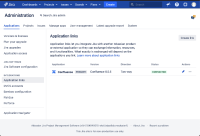
- This automatically creates an entry on Jira's Application Navigator.
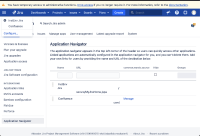
- This entry isn't added to the database (which is expected), so running the below query won't yeld any result.
SELECT pt.*
FROM propertytext pt
JOIN propertyentry pe
 ON pe.id = pt.id
WHERE pe.property_key = 'com.atlassian.plugins.custom_apps.customAppsAsJSON';
- This entry isn't added to the database (which is expected), so running the below query won't yeld any result.
- Manually add a bogus entry on the Application Navigator.
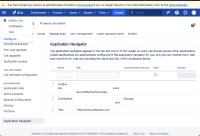
- Checking from the database, there will be 3 entries related to the Application Navigator configuration (Jira, Confluence and generic).
SELECT pt.*
FROM propertytext pt
JOIN propertyentry pe
 ON pe.id = pt.id
WHERE pe.property_key = 'com.atlassian.plugins.custom_apps.customAppsAsJSON';
[{ "baseUrl": "<Jira-Base-URL>/secure/MyJiraHome.jspa", "applicationType": "jira", "hide": false, "displayName": "InstEnv Jira", "editable": false, "self": true, "id": "1", "url": "<Jira-Base-URL>/secure/MyJiraHome.jspa", "applicationName": "InstEnv Jira", "allowedGroups": [] }, { "baseUrl": "<Confluence-Base-URL>", "applicationType": "confluence", "hide": false, "displayName": "Confluence", "editable": false, "self": false, "id": "2", "url": "<Confluence-Base-URL>", "applicationName": "Confluence", "allowedGroups": [] }, { "applicationType": "generic", "hide": false, "displayName": "Test", "editable": true, "self": false, "id": "3", "url": "https://www.atlassian.com", "allowedGroups": [] }] - Delete the application link to Confluence.


Expected Results
Confluence doesn't appear as an option on the Application Navigator.
Checking from the database, there won't be an entry related to Confluence.
Actual Results
Confluence doesn't appear as an option on the Application Navigator.

Checking from the database, there's still reference to Confluence.
[{
    "baseUrl": "<Jira-Base-URL>/secure/MyJiraHome.jspa",
    "applicationType": "jira",
    "hide": false,
    "displayName": "InstEnv Jira",
    "editable": false,
    "self": true,
    "id": "1",
    "url": "<Jira-Base-URL>/secure/MyJiraHome.jspa",
    "applicationName": "InstEnv Jira",
    "allowedGroups": []
}, {
    "baseUrl": "<Confluence-Base-URL>",
    "applicationType": "confluence",
    "hide": false,
    "displayName": "Confluence",
    "editable": false,
    "self": false,
    "id": "2",
    "url": "<Confluence-Base-URL>",
    "applicationName": "Confluence",
    "allowedGroups": []
}, {
    "applicationType": "generic",
    "hide": false,
    "displayName": "Test",
    "editable": true,
    "self": false,
    "id": "3",
    "url": "https://www.atlassian.com",
    "allowedGroups": []
}]
Restarting Jira won't make any effect on this.
Adding/removing application links won't change anything on the database.
Entries from the com.atlassian.plugins.custom_apps.customAppsAsJSON property appears on the System info admin page.
It may be confusing to administrators that are still entries referring to removed application links, which won't appear anywhere else.
Workaround
Add and remove any bogus entry on the Application Navigator and that will refresh entries from the com.atlassian.plugins.custom_apps.customAppsAsJSON property.


- is cloned by
-
WILDT-378 Loading...