-
Type:
Bug
-
Resolution: Unresolved
-
Priority:
 Low
Low
-
None
-
Affects Version/s: 8.20.0
-
Component/s: Administration - Others
-
8.2
-
4
-
Severity 3 - Minor
Issue Summary
unable to insert valid license for Advanced Roadmaps Server
Steps to Reproduce
- Install a Jira Server version prior to 8.5.0
- Install Advanced Roadmaps Server version plugin by manually uploading obr.
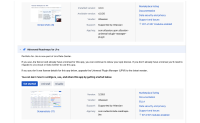
- Note that there is no way to insert a valid Advanced Roadmaps license for Server (bought before End of Sales announcement):
- Upgrade UPM to the latest compatible version directly from Marketplace
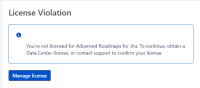
- Note that still is not possible to insert a valid Advanced Roadmaps Server license and while trying to use the plugin an error message is thrown out:


Expected Results
It should be possible to insert a valid Server license for Advanced Roadmaps bought before End of Sale.
Actual Results
There is no way to insert a valid license for Server.
The below WARN is thrown in the atlassian-jira.log file:
2021-06-07 08:13:29,687 https-jsse-nio-443-exec-1 WARN ms01 493x34775x1 soungt 172.30.58.245 /secure/PortfolioPermissions.jspa [c.r.p.jira.views.BaseAutheticatedRoadmapsView] Please purchase a license or get an evaluation license if you want to use Portfolio for Jira.
Workaround
Manually download the latest UPM version for Jira Server from here, disregarding the fact that is shown as uncompatible with the current Jira Server version and the license box will be available again for Advanced Roadmaps to insert in Manage Apps.


- mentioned in
-
Page Loading...