-
Type:
Bug
-
Resolution: Fixed
-
Priority:
 High
High
-
Affects Version/s: 8.15.0
-
Component/s: Dashboards & Reports - Reports
-
8.15
-
5
-
Severity 3 - Minor
-
5
Issue Summary
Pie chart label fonts overlapping with each other after upgrading Jira
Steps to Reproduce
- Create a Pie Chart Reports
- Navigate to Software Project > Project Reports > Pie Chart Report > Statistic Type as Assignee > Next
- Pre-Requisite : The labels will overlap in case some labels are having too long text
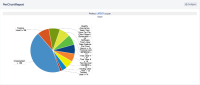
- The Report will be generated and will have some data like below:

Expected Results
The Pie Chart Report data should not overlap
Image from previous version i.e. 8.2.2: 
Actual Results
The Pie Chart Report data is overlapping
Workaround
Currently there is no known workaround for this behavior. A workaround will be added here when available


- is caused by
-
JACCESS-1159 Loading...
- is duplicated by
-