-
Type:
Bug
-
Resolution: Unresolved
-
Priority:
 Low
Low
-
None
-
Affects Version/s: 8.5.3, 8.13.0, 8.20.8, 8.22.4
-
Component/s: Dashboard & Gadgets
-
8.05
-
12
-
Severity 3 - Minor
-
1
Issue summary
The owner of a dashboard can't be changed if the dashboard had been shared with a user who was synced from an LDAP directory and then removed from that directory.
Steps to replicate
- Install Jira 8.13.0
- Configure Jira with an LDAP directory in ⚙ > User Management > User Directories
- Ensure that the LDAP directory has at least one user
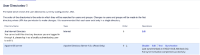
- Sync Jira with the directory
- Verify that the user was synced in Jira from the LDAP
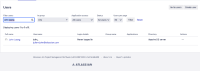
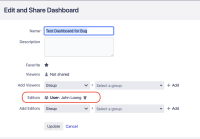
- Create a new dashboard, and grant the edit permission to the LDAP user
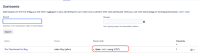
- Go to ⚙ > System > SHARED ITEMS > Dashboard, and verify that you can see the new dashboard, along with the user it was shared with:
- Go to the LDAP server and remove the LDAP user
- Sync Jira with the directory in ⚙ > User Management > User Directories
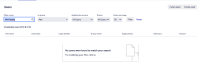
- Verify that the LDAP user is no longer in Jira:
- Go to ⚙ > System > SHARED ITEMS > Dashboard, and now observe that the dashboard is shared with "User: User is invalid (EDIT)"
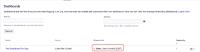
- Click on ⚙ > Change owner next to this dashboard
- Select a new user to be the owner of this dashboard
- Click on Change owner


Expected results
The owner of the dashboard should be changed to the new user.
Actual results
The owner of the dashboard is not changed, and the following error is displayed in the UI:
User: 'XXXXX' does not exist

Workaround
Workaround 1
Log in as the user who currently owns the dashboard, log into Jira as this user, and remove the LDAP user that the dashboard is shared with:

 If the current owner of the dashboard no longer works in your organization, the Jira System Admin can reset the password of this user provided that this user is from Jira's internal directory. If that's the case, go to ⚙ > User Management > Users, look for the user, click on it, then go to Actions > Set password.
Workaround 2
Remove the dashboard share with the LDAP user directory from the database:
- Stop Jira
- Backup your Jira Database, so that you can revert the changes made to the database if anything goes wrong
- Run the following SQL query to list all the users the dashboard is shared with, after replacing <DASHBOARD_NAME> with the name of the dashboard:
select * from sharepermissions where entitytype = 'PortalPage' and sharetype = 'user' and entityid = (select id from portalpage where pagename = '<DASHBOARD_NAME>');
- Example of output below (only for your reference):
  id   | entityid | entitytype | sharetype |    param1     | param2 | rights
-------+----------+------------+-----------+---------------+--------+--------
 10619 |    10301 | PortalPage | user      | JIRAUSER10840 |        |      3
- Example of output below (only for your reference):
- Search for the row where the value in the "param1" column corresponds to the user that the error was complaining about (it should correspond to the user_key of the deleted LDAP user). Note the value in the ID column (which is 10619 in the example below)
- After you identify the ID of the row that needs to be deleted, run the following delete query after replacing <ID> with the id identified above:
delete from sharepermissions where id = <ID>;
- Start Jira
Note
This bug only occurs if the the user the dashboard was shared with is deleted from a sync with the LDAP directory.
If the user is from the Jira internal directory and is deleted from the Jira UI, the dashboard share with this user will properly be deleted in the database (from the sharepermissions table), and the bug won't occur.


