-
Type:
Bug
-
Resolution: Low Engagement
-
Priority:
 Low
Low
-
None
-
Affects Version/s: 7.6.3, 7.10.1, 7.11.1
-
Component/s: Project Administration - Users and Roles
-
7.06
-
1
-
Severity 3 - Minor
-
0
Summary
From Project settings -> Users and roles, the Roles drop-down list has a maximum width by default.
In case there're multiple roles with long names, all starting with the same prefix, the list does not show the full role names and it's not possible to tell one from another.
Steps to reproduce
- From JIRA Administration -> System -> Project roles, create several roles with long names starting with the same prefix
- From Project settings -> Users and roles, click the Roles drop-down list
Expected behavior
The list auto expands and shows the full names of the new roles
Actual behavior
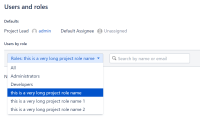
The list does not auto expand and only shows its default width, and it's not possible to tell the new roles from one another:

Workaround
Workaround 1
- Select 1 of the long roles
- Click the Roles drop-down list again
- Now it shows the full names of the roles with similar name length:

Workaround 2
- Enter the following code into Announcement banner, which will set minimum dropdown element width to 500px (other value can be used):
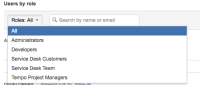
<style type="text/css"> #select2-drop { min-width: 500px; } </style> - Now the element will get wider after opening:


- relates to
-
JRASERVER-45352 New 'Project Roles' view is not concise enough
- Closed
-
- Closed