 High
High Summary
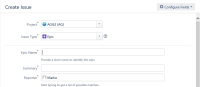
In IE browser, required fields not marked as required ("*" sign is missing)
Steps to Reproduce
- Make some field as required
- Access JIRA using IE browser
- From Dashboard or "Search issues" screen, click "Create Issue" form > Dialog opens
- Go to other non-project or issue related (eg. JIRA Settings > System) > click "Create Issue" > Inline create form opens
Expected Results
Required fields should be shown as required (with "*" sign)
Actual Results
Required fields are not shown as required:

Workaround
- Go to Projects > select Project > click Create Issue > dialog opens and fields are shown as required:
- Use other browser


- is duplicated by
-
JRASERVER-67634 Missing Required Fields Icon (Red Asterisk) in Internet Explorer
-

- Closed
-
- relates to
-
MNSTR-1867 Loading...