-
Type:
Bug
-
Resolution: Unresolved
-
Priority:
 Low
Low
-
None
-
Affects Version/s: 7.3.7, 7.5.1, 7.9.0, 7.9.2, 7.13.0, 8.0.2
-
Component/s: Jira Importers Plugin
-
7.03
-
11
-
Severity 2 - Major
-
1
Summary
When importing issues using CSV imports, username value for user field (eg. Assignee) that contains space between words (eg. "test user") gets mapped as username without space (eg. "testuser").
Steps to Reproduce
- Create two users:
- One with username without space between individual words (eg. testuser)
- The other with space (eg. test user)
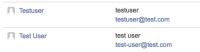
- Construct CSV file that contains value "test user" for user field value (eg. Assignee)
- Import the CSV file using External System Import
- The imported issue refers the user without space in the username (testuser)


Expected Results
The field value gets mapped correct to username "test user" (the space doesn't get ignored).
Actual Results
Space in username gets ignored and the field value gets mapped to wrong username without space "testuser".
Workaround
-
Notes
- Tried to put username in quotes: "test user", didn't have effect.
- Tried to do the import with "Map field value" for user field (Assignee), also didn't have effect.

