-
Type:
Bug
-
Resolution: Done
-
Priority:
 Low
Low
-
Affects Version/s: 7.5.0, 7.6.3, 7.6.10, 7.11.2, 7.13.0, 8.12.2, 8.18.1
-
Component/s: Rich Text Editor
-
7.05
-
10
-
Severity 2 - Major
-
2
Summary
Link containing issue key and / or filter appears as a normal text after changing the comment in Visual mode.
Steps to Reproduce
- Open Search for Issues page or search project's issues via Project sidebar
- Add new comment in Text mode
- Include link that includes URL to the issue via "Search for Issues" functionality (must contain /browse/<issue_key>) and/or applied filter (eg. http://localhost:8080/jira750/browse/TEST-75?jql=project%20%3D%20TEST) and add some text after:
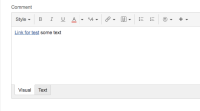
- Save the comment, link appears as it should.
- Edit the comment in Visual mode
- Add some text behind:
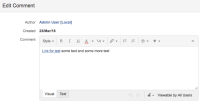
- Save the comment


Expected Results
Changing the comment preserves the link
Actual Results
After changing the comment, the link appears as plain text and link information is lost:

Workaround
-
Notes
- The behaviour can't be reproduced if the link contains part of the URL that is referring to the issue via project (containing /projects/<project_name>/issues/<issue_key>, eg. http://localhost:8080/jira750/projects/TEST/issues/TEST-75?filter=allopenissues)


- is duplicated by
-
-
- Gathering Impact
-
- is related to
-
-
- Gathering Impact
-