-
Type:
Bug
-
Resolution: Unresolved
-
Priority:
 Low
Low
-
None
-
Affects Version/s: 7.6.0, 7.7.2, 7.12.1, 8.0.2, 8.5.3, 8.7.1, 8.8.0, 9.4.3, 9.14.0
-
Component/s: System Administration - Priorities
-
7.06
-
22
-
Severity 3 - Minor
-
4
Summary
If you start by viewing Project A and attempt to create an issue in Project A, the default priority that is specified in the priority scheme is enforced correctly, and vice-versa for viewing Project B and attempting to create an issue in Project B. But, if you have a Default Priority scheme set on the two different projects and create an issue while in project A then switch to project B while on the create issue screen the Default priority from project A is applied to the issue being created in project B, and The priority scheme for project B is ignored.
Steps to Reproduce
- Create 2 projects
- Create 2 Priority Schemes
- associate each scheme to one of the projects
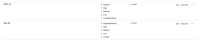
- Set Highest priority as default on one and lowest on the other EXE:
- Navigate to Project A and select Create to trigger create issue screen Note the Default priority is set to Lowest:
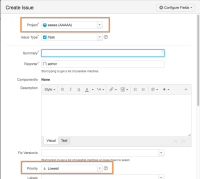
- Use the project drop down to Switch to Project B


Expected Results
Default Priority is set to the Default value per the scheme
Actual Results
The Default value from Project A is left behind, in the EXE priority should be Highest but is set to Lowest:

Notes
- Navigate to project B and create an issue the value will be set to project B's default value
- This seems to happen in the Create Issue popup only.
Workaround
- Manual verification is the only current validation method
- Under some circumstances where this has to be avoided completely, we can disable the Create Issue popup by following this KB: How to disable Create Issue popup. The method, "Disable via Javascript" is the easiest to apply in this case where it will force the issue creation in a full page instead of a popup.


