-
Type:
Suggestion
-
Resolution: Unresolved
-
None
-
Component/s: Rich Text Editor
-
3
Summary
When using the rich text editor with tables, the copy/paste is not user friendly enough. Copy pasting several columns/rows and pasting it in a table will create a smaller table. For example
- Use Visual mode
- Copy the following table
a b c d - Paste it in the X in the below table
1 2 3 X 6 7 8 - Expecting to see
1 2 3 a b 6 7 8 c d - When you paste it though, you will see the following
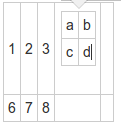
- However, once you save it, you will get the following instead
1 2 3 a b c d 6 7 8

Suggestion
Improve the copy/paste abilities in rich text editor visual mode
