-
Type:
Bug
-
Resolution: Low Engagement
-
Priority:
 Low
Low
-
None
-
Affects Version/s: 7.2.0, 7.2.2, 7.5.1
-
Component/s: Project Administration - Components
-
7.02
-
5
-
Severity 2 - Major
-
0
Summary
After upgrading from JIRA 7.2 to 7.2.2 and using the built in Russian Language. Accessing components of projects that existed earlier in 7.2 results in an empty page.
Steps to Reproduce
- Create a project and components in JIRA 7.2. (Example: project1)
- Upgrade JIRA 7.2 to 7.2.2.
- Change the system language to Russian.
- Access the project1's components page.
- An empty page will appear
Expected Results
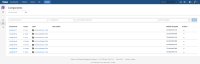
- The components should appear under the component screen, as it does when the English language is chosen:

Actual Results
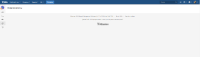
- When using Russian Language, nothing appears as the screenshot below shows:

Workaround
- Change the language to English


- relates to
-
-

- Closed
-
- mentioned in
-
Page Loading...