-
Type:
Bug
-
Resolution: Unresolved
-
Priority:
 Low
Low
-
None
-
Affects Version/s: 7.1.2, 7.1.8, 7.1.9, 7.2.0
-
Component/s: Dashboard & Gadgets
-
7.01
-
13
-
Severity 3 - Minor
-
1
NOTE: This bug report is for JIRA Server. Using JIRA Cloud? See the corresponding bug report.
PROBLEM:
When clicking the menu icon dropdown in a project gadget, it shows an empty box.

STEPS TO REPRODUCE:
- Go to the dashboard
- Add "Project gadget"
- Fill in the configuration and save
- Click on the Menu Icon
Expected Result
- It should show the Summary, Issues, Reports etc.
- Tested it in SAC and it works fine there.
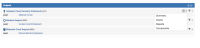
- Clicking the empty box directs me to the correct page

ACTUAL RESULT
- Clicking the menu icon dropdown displays an empty box without any wordings
- Clicking the empty box directs me to the correct page
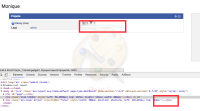
ENVIRONMENT:
- JIRA 7.1.8
- JIRA 7.1.2


- relates to
-
-
- Closed
-