-
Type:
Bug
-
Resolution: Low Engagement
-
Priority:
 Low
Low
-
None
-
Affects Version/s: 6.2.1, 6.3.11, 6.4, 7.1.2, 7.1.4, 7.2.1, 7.3.0
-
Component/s: User Management - Others
-
6.02
-
10
-
Severity 3 - Minor
-
0
Summary:
Bulk edit group members - begin typing to find users does not work as described.
Users are not auto-completed
Steps to Reproduce:
- Go to User Management >> Groups >> Bulk Edit Group Members
- Start typing a user name in the Add members to selected group(s) box.
Expected Results:
Expected to have username suggestions.
Actual Results:
Nothing really happens until you press the group icon next to it.
Note
Could you please verify if this is intentional?
Workaround
- Open Bulk edit group members.
- Click
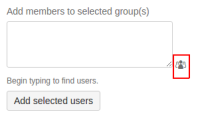
- Click on
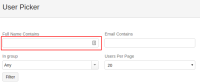 , type a partial name and enter. This will produce name.
 - Select name and click Select


