-
Type:
Suggestion
-
Resolution: Unresolved
-
Component/s: Plans - List
-
None
-
1
Issue Summary
When viewing the timeline view on a plan, any dependencies that are overlapping are highlighted with a red arrow to indicate the overlap. However, when you switch to the List mode, there are no warnings visible.
Users who normally use List mode to make changes might miss overlapping dependent issues as a result.
Steps to Reproduce
- Create a Jira plan and populate some issues that have overlapping dependencies
- Use a blocks link and ensure that the source issue has start dates that are past the start date on the issue being blocked
- View the timeline for the plan and confirm you can see the dependency warning
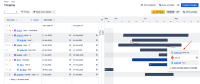
- Now switch to the List mode. Add the dependencies field to the view if not already visible
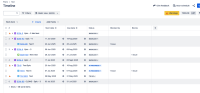
- Notice that while the dependencies are shown, there is no visible warning ( similar to timeline view ) to indicate that these dependencies overlap


Expected Results
A warning icon is shown on the Blocks or Blocked By columns to indicate overlap
Actual Results
No visible UI warnings indicate an overlap
Workaround
Whilst not a workaround, hovering over the dependency will display that the lead time is negative


