-
Type:
Suggestion
-
Resolution: Unresolved
-
None
-
1
Issue Summary
Issue search displays work item URLs/smart links inconsistently
Steps to Reproduce
- Add 3 custom fields to a project/issue type:
- Paragraph/multi-line text field
- Short/Single line text field
- URL field.
- Enter the same issue key on all 3 fields.
- In the Work item/Issue Search for the field in the issue navigator, configuring the 3 fields to be visible.
Expected Results
The 3 fields render the URLs in the same way.
Actual Results
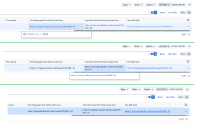
The URLs are rendered in a different way:
- Paragraph fields display the URL as plain text, when you click over it you get a smart link render in an expanded section.
- Short text displays the URL displays the URL as plain text, and when clicking on it, it displays the URL once again, and it is still plain text, but it is not a hyperlink
- URL fields give a straight hyperlink

Notes:
- The issue view displays smart links for the 3m types of custom fields consistently.
- The old Work item/issue Search consistently displays the same formatting for all text fields:


Workaround
Currently there is no known workaround for this behavior. A workaround will be added here when available


- mentioned in
-
Page Loading...