-
Type:
Bug
-
Resolution: Duplicate
-
Priority:
 Low
Low
-
Component/s: Navigation - Horizontal Tabs
-
None
-
1
-
Severity 3 - Minor
Issue Summary
When we install add-on these add-on's are shown in the left panel when we open a Jira Service Management project.
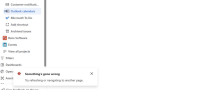
In the New Navigation, these add-ons are displayed when we expand the project in the left panel, and when we click on any Third-party add-ons or the Default Slack Integration add-on the UI displays an error "Something's gone wrong", though the add-on itself loads fine.
Steps to Reproduce
- Open a Jira Service Management project on a Cloud site that has new navigation.
- Click on the any add-ons at the bottom of the Project's expanded option:

Expected Results
Add-on page loads without error pop-up
Actual Results
We get an error pop-up "Something's gone wrong", though the app loads fine.
Workaround
Currently there is no known workaround for this behavior. A workaround will be added here when available

- is duplicated by
-
-
- Closed
-