-
Type:
Bug
-
Resolution: Unresolved
-
Priority:
 Medium
-
Component/s: Backlog - Sprints
-
5
-
Minor
-
1
When creating a sprint out of a DST date, it will result in all date/times indicated for Start/End that are inside DST getting an hour added when viewed in the Active sprints.
- Set your timezone to GMT+1 (I tested GMT -8, you could test any timezone that employs DST).
- Go to a board's backlog to create a sprint, and configure it to start/finish on a date between the start and end of Daylight Saving Time (Sun, Mar 26, 2023 - Sun, Oct 29, 2023), in this example the end date was configured to be 3/12/25 11:30 PM
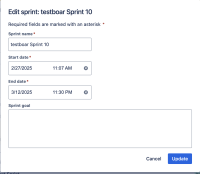
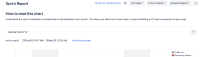
- Go to the Reports>Sprint Report and pull down to the specific sprint, and see that the end time shown as 13/Mar/25 12:30 AM.


Expected Results
The date/time matches the ones indicated when creating/editing the sprint from the backlog.
Actual Results
The Reports>Sprint reports page shows 1 hour ahead of the data indicated in the Backlog: From our example, it shows 12:30 AM the following date instead of 11:30 PM. Note that the start date appears correctly as this date is out of DST.
Workaround
Currently there is no known workaround for this behavior. A workaround will be added here when available


