-
Type:
Suggestion
-
Resolution: Low Engagement
-
None
-
0
Scenario
Using a Simplified Workflow, a Board-Project Admin can add a new status or remove an existing one if it does not contain any issues. However, it's not easy to change the Initial Status to a new one from Board Configuration. Example:
- The workflow originally contains To Do, In Progress, and Done, in which To Do is the Initial Status of every newly created issue
- A new status is added called New and the Board-Project Admin (which is not a JIRA admin) would like it to become the Initial Status instead of To Do
- He can't edit the workflow from JIRA Administration
Suggestion
There should be an easy way for the Board-Project Admin to set a newly added status as the Initial Status, similar to marking which status has Resolution set.
Workaround
Assume that there're now New, To Do, In Progress, and Done available, in which To Do is the Initial Status and the Board-Project Admin would like to set it to New:
- transition all issues from To Do to New
- add New to the leftmost column and move it to the top of the column
- drag To Do to Unmapped Statuses and remove it
 JIRA Agile prompts to replace To Do with New as the Initial Status:
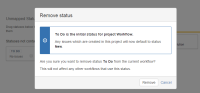
- click Remove
- to get To Do back, click Add Status and select it from the list of Existing Statuses
- drag To Do to an appropriate column

 New will still be the Initial Column
