-
Type:
Suggestion
-
Resolution: Timed out
-
Component/s: Work Item - Other Issues
-
1
Issue Summary
This is reproducible on Data Center: (yes) / (no)
Steps to Reproduce
Create a Custom Field:
- Go to Jira Administration > Issues > Custom Fields.
- Click on Add Custom Field and select the appropriate field type (e.g., text field, checkbox, etc.) for your checklist items.
- Configure the custom field by providing a name and description.
Add Custom Field to Issue View Screen:
- Navigate to Screens in the Jira Administration panel.
- Select the screen associated with the issue type (e.g., Epic) where you want the custom field to appear.
- Add the custom field to the chosen screen.
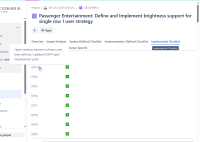
Hover Tooltip Behavior:
- When users hover over the tooltip of the respective custom fields in the issue view, the full details or descriptions of the checklist items should be displayed.

Expected Results
- Users should be able to see the complete checklist item descriptions directly in the issue view, without needing to hover over the field.
- Checklist descriptions should be displayed in a prominent, easily accessible manner, such as a read-only subfield or a dedicated section within the issue view.
- This enhancement would allow users to quickly reference checklist details, improving usability and ensuring that all necessary information is readily available.
Actual Results
- Currently, checklist item descriptions are only visible on mouse hover in the issue view.
- Users may overlook important checklist information due to its limited visibility, leading to incomplete tasks or misunderstandings about checklist requirements.
- There is no direct way to view the full checklist item descriptions without hovering, which can disrupt workflow and efficiency.
Workaround
Currently there is no known workaround for this behavior.
