-
Type:
Bug
-
Resolution: Timed out
-
Priority:
 Low
Low
-
Component/s: Plans - Administer Plans
-
2
-
Severity 3 - Minor
Issue Summary
Advanced Roadmaps Roll-up dates based on Sprints are removed if you complete the sprint.
As long as the sprint is active, the start and due date are displayed, but if you complete the sprint, those dates are removed.
It’s happening with issues in any status. As soon as the sprint is completed and the issue is moved to the backlog, the start and due date are removed from Adv Roadmap
Steps to Reproduce
- Create issues inside the Epic
- Select Roll-up > Dates in View settings
- In Inferred dates selected Sprint dates option. The Start and Due date will be displayed based on the Sprint date:
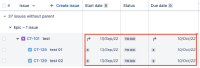
- Complete the Sprint and send the issues to the Backlog

Expected Results
The Start and Due date will be kept.
Actual Results
The Start and Due date are removed.
Workaround
Currently there is no known workaround for this behavior. A workaround will be added here when available

- relates to
-
JPO-20913 Loading...