-
Type:
Bug
-
Resolution: Duplicate
-
Priority:
 Low
Low
-
Component/s: Work Item - Transition Screen
-
2
-
Severity 3 - Minor
This is duplicate of JRACLOUD-92182. Please follow https://jira.atlassian.com/browse/JRACLOUD-92182 for updates.
Issue Summary
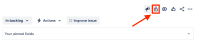
In the issue view you can use the lock icon to add a security level as long as the field Security level is added to the screen and there is an issue security scheme associated to the project.
If there is no security scheme associated to the project the icon will not be displayed:
- With security scheme:
- Without security scheme:
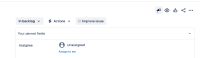


The transition screen does not respect that and displays the field as long as it is added to the screen. In case the project has no security scheme you will not be able to complete the transition due to an error:
"Field 'security' cannot be set. It is not on the appropriate screen, or unknown.

Steps to Reproduce
- Add a transition screen that contains the field Security level to a transition in a workflow of a project that does not have a security scheme set
- Try to perform the transition that you added the screen to
Expected Results
You either will not see security level or you will be able to conclude the transition without any errors.
Actual Results
An error message is displayed and you cannot conclude the transition.
Workaround
Remove the field Security level from the screen.


- duplicates
-
-

- Closed
-
- relates to
-
-
- Closed
-