-
Type:
Bug
-
Resolution: Unresolved
-
Priority:
 Medium
-
Component/s: Work Item - System Fields
-
None
-
11
-
Minor
-
4
Issue Summary
Currently, the Development fields are displayed even though the feature is disabled on Team manage the project.
Steps to Reproduce
- Disable Feature by going to Project Settings -
> Features->Development
Expected Results
If the Development feature is disabled on the Team manage project then the Dev panel should not appear on the Issue screen

Actual Results
Development Panel Appears in issue view

Workaround
- Create a new team-managed role based on the Member role.
- Disable the Access development tools permission.
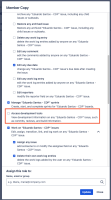
- Associate all existing users in the old role with the new one.


- is related to
-
JRACLOUD-92572 Disabling "Code" feature on team-managed project should hide "Development panel"
- Gathering Interest