-
Type:
Bug
-
Resolution: Fixed
-
Priority:
 High
High
-
Component/s: Board (Company) - Create
-
8
-
Severity 2 - Major
-
7
Issue Summary
Create Board button is greyed out when user selects "Board from an existing project"
Steps to Reproduce
- Go to https://<your site name>.atlassian.net/jira/boards and click Create board
- Click either Create a Scrum board or Create a Kanban board and click Next
- Select "Board from an existing project" and click Next
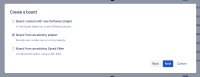
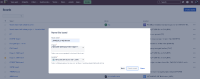
- Fill out all three fields on the Name this board screen of the Create board modal. Observe that the create board button remains greyed-out:


Expected Results
None-greyed out button
Actual Results
as above
Workaround
If you are experiencing this issue we recommend creating a Support Ticket with us so we can try to apply a temporary workaround to activate the Create board button.

