-
Type:
Bug
-
Resolution: Fixed
-
Priority:
 Low
Low
-
Component/s: Backlog - Sprints
-
None
-
1
-
Severity 2 - Major
Issue Summary
Depending on the Timezone of your profile (for example, GMT+3) and if you have "Enhance my board and backlog" turned on, there are time inconsistencies on the Sprint End Date.
Steps to Reproduce
- Create a Future Sprint that will end at 11 PM
- Change your Timezone Preference in your profile to GMT+3
- Make sure that the feature "Enhance my board and backlog" is turned on
- Open the Sprint details, by clicking on "Edit Sprint" in the Backlog screen.
Expected Results
- Jira should show consistent results of dates.
Actual Results
- Jira displays a wrong date, showing that it would end the next day (as seen in the below screenshot.
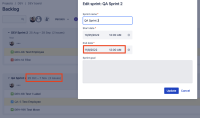

Workaround
Disable the "Enhance my board and backlog" feature.
