-
Type:
Bug
-
Resolution: Timed out
-
Priority:
 Low
Low
-
Component/s: Space - Development - Releases
-
Severity 3 - Minor
Issue Summary
The history tab does not reflect the actual changes made to the fields below when they contain multiple values:
- Fix Version/s
- Affects Version/s
- Component/s
For example:
- if the Fix Version/s field contains 1 value and a 2nd value is added to it, the "previous value" column will show an empty value
- or, if the Fix Version/s field contains 2 values and 1 value is removed, the previous value will only show the value that was removed instead of showing the 2 values
Steps to Reproduce
- Create 3 components
- Create 3 versions
- Open a Jira issue
- Add the 3 component to the issue
- Add the 3 version to the issue
- Check the history tab
Expected Results
The previous value and new value columns of the history tab should reflect the actual content of the fields as they were before and after.
Actual Results
The previous and new value columns never reflect the content of the fields that were modified.
Instead, these columns only show 1 or 0 values.
For example:
- if we add 3 component (1 at a time), we should expect:
- the Previous column to show:
- 0 component
- then 1 component
- then 2 components
- the new column to show:
- 1 component
- then 2 component
- then 3 components
- the Previous column to show:
- Instead, the previous column always shows 0 value, and the new column always shows 1 value only
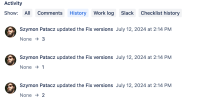

The same can be observed with the Fix Version/s field when versions are added 1 by 1. The history tab does not show multiple values in either the previous or new column
The same issue also happens when the Fix Version/s field already has multiple values, and each value is removed 1 by 1

Note 1
This bug does not impact the Labels field. If multiple labels are added (1 at a time), then the history tab shows the right new and old values:
Note 2
This bug impacts the changelog smart value when using Automation For Jira. The changelog smart value is also missing some values when a value is added on top of another one for the impacted fields (Components, Fix Versions, Affected Versions).
Workaround
Currently there is no known workaround for this behavior.


- is duplicated by
-
-

- Closed
-