-
Type:
Bug
-
Resolution: Fixed
-
Priority:
 High
High
-
Component/s: Backlog (Company) - Filters
-
None
-
8
-
Minor
Issue: "Search Backlog" functionality in the Backlog is case-sensitive
Issue Summary
The "Search Backlog" feature in the Backlog is case-sensitive.
Steps to Reproduce
- Navigate to the Backlog section on the Board
- Consider "Case Sensitive" is the Summary of an issue listed in the Backlog
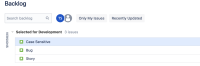
- Search for the issue with the phrase "case"

Expected Results
The issue should be listed
Actual Results
The issue is not filtered

Workaround
Reloading the page shows the right results.


- mentioned in
-
Page Loading...