-
Type:
Bug
-
Resolution: Fixed
-
Priority:
 Low
Low
-
Component/s: Navigation - Your work
-
None
-
5
-
Minor
Issue Summary
- The latest worked issue is not reflected under the Your Work --> Worked on list.
- The worked-on list needs to be updated when the issue is created, and the comment is added to the issue however in this scenario the list is not updating.
Steps to Reproduce
- Go to any issue and create a comment on the issue.
- Open the Your work dropdown in the top navigation bar and select the worked on tab.
- You will not find the latest issue where the comment was added
Expected Results
- Worked on tab under Your work should show the latest issue user worked on.
Actual Results
- Your Work dropdown doesn't show the latest activity from the user.
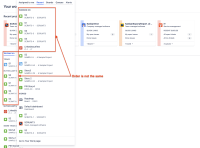
 The call brings the correct list, it just not getting updated:
items: [
0: {title: "S1", subtitle: "SCRMT3-1", metadata: "SCRMT3-1",…}
1: {title: "S2", subtitle: "SCRMT3-3", metadata: "SCRMT3-3",…}
2: {title: "S1", subtitle: "SAMPLE-54", metadata: "SAMPLE-54",…}
3: {title: "S4", subtitle: "SCRMT3-5", metadata: "SCRMT3-5",…}

Workaround
Use the Your work page (/jira/your-work) instead of the dropdown menu to view recently worked on issues as it shows the correct data.
