-
Type:
Bug
-
Resolution: Fixed
-
Priority:
 High
High
-
8
-
Severity 3 - Minor
-
3
Issue Summary
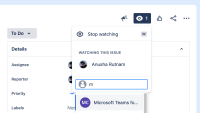
When clicking on an issue > watcher (eye symbol) and then Add watchers, the input that appears has an icon that overlaps with the placeholder text "Add watchers".

Steps to Reproduce
- Go to a Jira issue and click the Watchers eye symbol and then click Add watchers (reproducable across Jira Service Management, Jira Work Management and Jira Software, team-managed and company-managed)
- Observe that an icon overlaps the placeholder text "Add watchers". This disappears once you start typing:

Expected Results
Placeholder text should not be obscured by other elements in the UI
Actual Results
Placeholder text is obscured by an icon

Workaround
No workaround is needed. Overlapping text disappears once you begin typing.


