-
Type:
Suggestion
-
Resolution: Won't Fix
-
Component/s: Work Item - View (Internal developer use only)
-
3
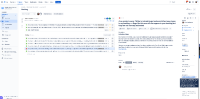
- When resized the detail pane switches to two-column layout.
- The comment button and entry field is always visible - reducing the useful screen space.
- collapsing the project side-bar (left) only increases the horizontal space for the left column (backlog) not the detail pane.
Steps to produce
- Open the board
- Increase the width of the detail view to the maximum allowed
What customer would like to see
The detail view pane uses the full width for the selected fields (nearly 1/2 the screen width)
How it is actually displays now
- The detail view switches to two-column layout (like the new Edit view) reducing the width of the fields, and screen space when editing description & comment fields.

- Reducing the width of the secondary column (on the right) still doesn't give as much space as to the description field, and makes some of the field content overlap the edge of the section.