-
Type:
Bug
-
Resolution: Fixed
-
Priority:
 High
High
-
Component/s: Space Administration - Workflows and statuses
-
Severity 2 - Major
Issue Summary
On Workflow Diagram Status text and background color has changed to Black color and now statuses in Done and In Progress category are really hard to read and you can't read the 'All' for Global transitions.
Steps to Reproduce
Open any Workflow Scheme with Diagram view.

Expected Results
It's better to have white lettering on darker colors.
Actual Results
You see black lettering and it's really hard to read status names now.
NOTE:
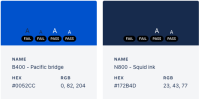
This color pallet violates the Atlassian design guidelines with Dark Text on a dark background flagged as a "Fail" condition:
- https://atlassian.design/foundations/color
We use blue (B400) for primary actions, buttons, text links, for indicating progress and representing authentication. Neutral (N800) is used primarily for body text and headings, and white (N0) is used for page backgrounds.

Workaround
Use the Text View for now.


- mentioned in
-
Page Loading...