-
Type:
Bug
-
Resolution: Timed out
-
Priority:
 Low
Low
-
Component/s: Dashboard - Dashboards & Gadgets
-
2
-
Minor
Issue Summary
When using the field Status Category Changed, the gadget Time since chart will not display any results.
It seems that its search is wrong. When checking the URL of its search, it is possible to see that the field is passed as statuscategorychangedate, which causes Jira to perform a wrong search:

Example: jql=project%20%3D%20"Maou%20Nobunaga"%20AND%20statuscategorychangedate%20>%3D%20-30d
URL example:
https://<name>.atlassian.net/rest/gadget/1.0/timeSince/generate?isConfigured=true&isPopup=false&isCumulative=true&name=TimechartOp&refresh=false&dateField=statuscategorychangedate&periodName=daily&projectOrFilterId=filter-10031&daysprevious=30&id=10031&type=filter&width=413&height=275&inline=true&returnData=false
The URL should send statusCategoryChangedDate instead, which works:

Steps to Reproduce
- Create a filter;
- Add the gadget Time since chart in a dashboard, using your filter as the source;
- Select the field Status Category Changed as the date field:
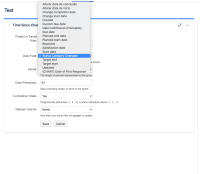

Expected Results
The results will load correctly.
Actual Results
No results are loaded correctly because the syntax of the field in the search performed by Jira is wrong.
Workaround
There is a free app called JavaScript Charts for Jira Cloud.
I was able to create a gadget that got really close to that scenario:

Notice that the app in question is not supported though.


