-
Type:
Bug
-
Resolution: Duplicate
-
Priority:
 Low
Low
-
Component/s: Space Administration - Workflows and statuses
-
None
-
1
-
Severity 3 - Minor
Issue Summary
Adding the post-function "Set issue security level based on user's project role" in the create issue transition doesn't set the security level while adding the same post-function to any other transition does.
Steps to Reproduce
- Add two users to JIRA. For example User A and User B;
- Create a project;
- In the project's People add User A to project role Administrators, and add User B to project role Developers;
- Create an issue security scheme (i.e. Test Security Scheme) with following security levels:
- Level A (Default)
- Level B
- Associate this issue security scheme with the project;
- Edit the project's workflow and add the following post-functions to Create Issue transition using the post-function Set issue security level based on user's project role:
- If user is a member of the Administrators role, set issue security level to Level A (Test Security Scheme).
- If user is a member of the Developers role, set issue security level to Level B (Test Security Scheme).
- Log in as User A (Administrators) and create an issue in the project. For example Test Issue.
Expected Results
The security level "Level A" should be set to the issue.
Actual Results
The security level is not set. This can be checked using the GET Issue API and looking for (command/ctrl + F) the field security.
Notes
If the same post-function is added to any other transition, for example In Progress, the security level is correctly set.
Workaround
- Transfer the post-function to any other transition than the Create Issue transition;
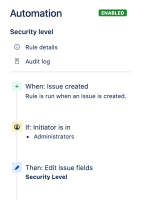
OR - Use the Automation example below to set the security level.


- is duplicated by
-
-
- Closed
-