-
Type:
Bug
-
Resolution: Timed out
-
Priority:
 Low
Low
-
1
-
Minor
Issue Summary
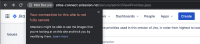
Using a HTTP image link on an issue causes the browser to render the page with a Not secure message on the Browser's URL.
Steps to Reproduce
- Create a priority name
- Use an image that is publicly accessible with only HTTP
- Create an issue and set that issue with the priority you just created
Expected Results
- Jira should enforce any Link to use HTTPS
Actual Results
- The Non HTTPS link causes the entire site page to be Not secure



Workaround
Make sure that any links used in the priorities uses HTTPS links.


- is duplicated by
-
-
- Closed
-