-
Type:
Bug
-
Resolution: Fixed
-
Priority:
 Low
Low
-
Component/s: Navigation - Your work
-
None
-
4
-
Minor
Issue Summary
When viewing https://<site-name>.atlassian.net/jira/your-work if you Atlassian Account is configured to use a language such as Italian, Japanese, French the shortcut for the queues on JSD projects will not load.
This presents slightly differently depending on if you have just Jira Service Desk or both Service Desk and Software.
If you have just JSD you will see an error message:

If you have multiple products the queue shortcut will just not load without an error:

Steps to Reproduce
- Create a JSD Site
- Create a project
- Change you account language in admin.atlassian.com to Italian for example
- Access the Your Work page
Expected Results
The page should load as expected and load all shortcuts to the JSD queues:

Actual Results
The page loads but the shortcuts either fail to load at all or show an error message depending on the products your site has.
- If your site has only Jira Service Desk:
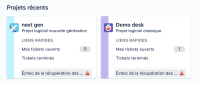

- If your site has Jira Service Desk and Software:


Workaround
Currently, there is no known workaround for this behavior. A workaround will be added here when available


