-
Type:
Bug
-
Resolution: Fixed
-
Priority:
 High
High
-
Component/s: Work Item - View (Internal developer use only)
-
7
-
Severity 3 - Minor
-
1
Issue Summary
User does not show up as inactive in New Issue View
Steps to Reproduce
- Create an issue and assign to say, Assignee
- Assignee comments in ticket.
- Deactivate Assignee
Expected Results
- Assignee shows as inactive in both old and new issue views
Actual Results
- Assignee shows as inactive in old but not in new issue view
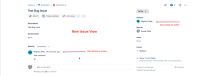
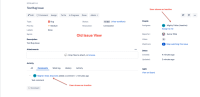


Workaround
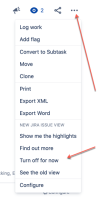
- Use old issue view by
- Adding the query parameter: ?oldIssueView=true to the URL, i.e. https://<instance_name>.atlassian.net/browse/<issue-key>?oldIssueView=true, or
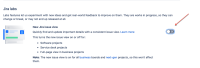
- Turn off Jira labs in https://<instance_name>.atlassian.net/secure/ViewPersonalSettings.jspa (this applies only to the your own personal settings)


- depends on
-
BENTO-6691 Loading...
- mentioned in
-