-
Type:
Bug
-
Resolution: Timed out
-
Priority:
 Low
Low
-
Component/s: Dashboard - Dashboards & Gadgets
-
2
-
Severity 3 - Minor
Issue Summary
The Pie chart gadget will not display results if the filter selected makes reference to another filter in its query (that is, filter = "filter"), and that filter being referenced cannot be found in the suggestions when building a JQL query.
Environment
Jira Cloud.
Steps to Reproduce
- Create a filter called Incidents;
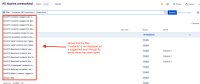
- Create multiple filters that contain the word Incidents in their names, until the filter called Incidents cannot be returned by the search's suggestion when building a JQL query:
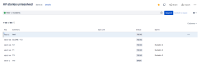
- Build a new filter that will use the previous filter (Incidents) as reference. You can save the query as it is (either with filter = Incidents, or filter = "Incidents"), and the search will work:
- Create a pie chart, and use the filter you've created on it. Save the preferences.


Expected Results
The gadget will display the results.
Actual Results
No results are displayed.
Instead, an error message with an error 500 is displayed:
Unfortunately, one or more of your preferences are now unavailable. Please update your preferences, or remove gadget by clicking delete from the title bar above.

filterId should not be null!
500
Workaround
Instead of using the name of the filter in the query, replace it by its id.
You can get the id of a filter by one of the following ways:
- REST API: https://yourinstance.atlassian.net/rest/api/3/filter/search will return the list of filters, including their ids;
- rest/api/3/filter/my will return the ones you own.
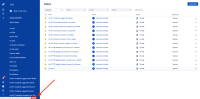
- If you hover over a filter, you will see an URL displaying its id in the end:
- Accessing a filter will give you the id in the address bar as well:



In my case, the filter query would change from filter = Incidents to filter = 10107.


