-
Type:
Bug
-
Resolution: Timed out
-
Priority:
 Low
Low
-
Component/s: Space Administration - Workflows and statuses
-
1
-
Severity 3 - Minor
Issue Summary
When we import a workflow from marketplace, it throws an error "Import wizard must be restarted"
Environment
- jira cloud
Steps to Reproduce
- Navigate to Workflows

- Click 'Import from Marketplace'

- Select a marketplace workflow
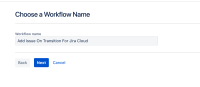
- Name it and click 'next'


Expected Results
Marketplace Workflow imported into workflows.
Actual Results
Default landing page for marketplace workflows brings up apps (add-ons), which if selected, cannot be added as workflows. If selected, error is displayed.

Error
Import wizard must be restarted.
Workaround
Search for "workflows" so that only workflows are displayed in results. Select one of them and proceed
. 


