-
Type:
Bug
-
Resolution: Timed out
-
Priority:
 Low
Low
-
Component/s: Space Administration - Workflows and statuses
-
2
-
Severity 3 - Minor
Summary
When editing an inactive workflow, Edge doesn't seem to respect the default "Screen" value of "None". So, when trying to add a transition - a 'blank' error message is displayed due to the "Screen" field not having a value.
Environment
- Cloud
Steps to Reproduce
- Navigate to Jira settings > Issues > Workflows; Inactive
- Click on a status, then click "Add transition"
- Configure the new transition and try to add the new transition
Expected Results
- The transition is added without issue
Actual Results
- 'Blank' error message is displayed
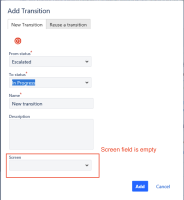

Notes
- This issue only seems to happen in Microsoft Edge, this is not on an issue on Chrome
- For some reason, on Edge, the "Screen" field is empty and will cause a HTTP 400 response

(Screen = NaN) - Edge is not respecting the "Screen" field's default value of "None"
- When performing the same action in Chrome, the "Screen" field value defaults to "None"


Workaround
- Ensure that the "Screen" field has a value before trying to add a transition
- Click on a random transition within the workflow you'd like to edit instead of a status - then click "Add transition"


