-
Type:
Bug
-
Resolution: Fixed
-
Priority:
 Low
Low
-
Component/s: Navigation - Top
-
None
-
3
-
Severity 2 - Major
Summary
In the updated navigation left sidebar, if the Cloud instance has the Sub Task Manager add-on, admins are unable to access the project-specific templates they had previously created.
Steps to Reproduce
- Pre req 1: Be sure your instance is using the updated navigation left sidebar;
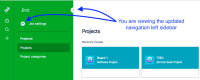
- Pre req 2: Be a Jira admin of that instance;
- Pre req 3: Have the "Sub Task Manager" add-on installed;
- Access a project.

Expected Results
- The project-specific templates from "Sub Task Manager" should be accessible in the left sidebar by the admin clicking the "Add-ons" sub menu.

Actual Results
- There is no "Add-ons" sub menu, so admins can't access the project-specific templates from "Sub Task Manager".

Workaround(s)
- If needed, create a globally available template;
- Open a support ticket at support.atlassian.com.


- mentioned in
-
Page Loading...