Summary
While using the keyboard shortcut, the text cursor does not focus correctly in the desired field.
Steps to Reproduce
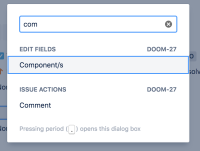
- Have an instance using the new Jira layout.
- Use the keyboard shortcut to edit an issue (.) and select a field, for example, Components

Expected Results
The text cursor focus in the desired field:

Actual Results
The field is selected, but not focused. Therefore, you still need to hit Tab to cycle between field or click on it.

Notes
The problem is not occurring in the old Jira UI.
Workaround
None.


