-
Type:
Bug
-
Resolution: Fixed
-
Priority:
 Low
Low
-
Component/s: ADG3, Work Item - View (Internal developer use only)
-
None
-
3
-
Severity 3 - Minor
Summary
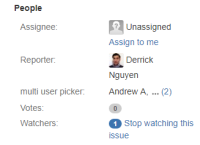
The "User Picker (multiple users)" custom field is not expandable under certain conditions. The length of the specified users' full names and resolution of the user's computer display seems to determine whether or not the custom field is expandable. This is an issue because it's not clear which users are specified if there are more than 2 users in the custom field.
Steps to Reproduce
- Create a new "User Picker (multiple users)" custom field and assign the new field to a screen.
- Create a new issue and add at least 3 users to the newly created custom field.
- Ensure that the 2nd user's name is equal or less than ~7 characters in length(including space)
- Check the resolution of the computer screen - this will change how the field is presented
Expected Results
- The custom field("multi user picker") should be expandable so that users are able to reveal all specified values within the custom field. The field shows a single user with 2 more values present in the field.
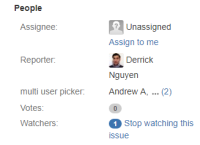

Actual Results
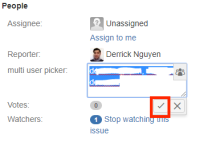
- The table below shows the same issue("multi user picker") but displayed with different screen resolutions. There are 3("Andrew A", "Bob Bob", "Charlie C") users in the "multi user picker" field.
1366x768 1280x768 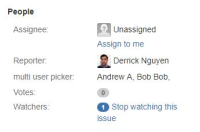

- The length of the user's full name affects how the "multi user picker" behaves. In this example, the 2nd user's name was changed from "Bob Bob" to "Bob Bobby1". Users with a full name of equal or more than 7 characters are not affected by this bug, but testing has shown that users with excessively long names are affected.
1366x768 1280x768 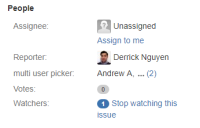
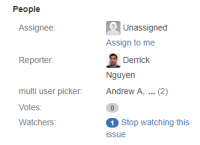


Notes
- Resolution that the user is using to view Jira affects how this field is displayed. This condition is reproduced differently on different resolutions depending on the character count on the second user's full name("Bob Bob" in this example).
- Full names without spaces seem to allow the "User Picker (multiple users)" field to be expandable as expected.
- This problem is not limited to 1366x768 and 1280x768, higher resolutions are reported to cause the problem, but we were unable to get consistent results while testing.
- Possible that aspect ratio has more to do with how the custom field is rendered rather than resolution.
- Issue affects multiple browsers and has been tested on OS X Sierra and Windows 10.
- Resizing the browser window makes no difference.
Workaround
- Editing the field allows the field to be expandable until the page is refreshed.
1 2 3 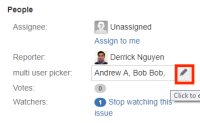


- is related to
-
NEXT-5994 Loading...