-
Type:
Bug
-
Resolution: Duplicate
-
Priority:
 Low
Low
Steps to reproduce:
- Make sure you don't have Assign Issues Permission.
- Click on create issue.
- On the resulting dialog, click on Configure Fields and then click on Where's my field?.
- Search for Assignee.
- You will see information about the Assignee permissions, and a link to Permissions and another link to People.
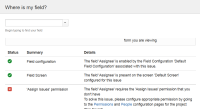
- Once you click on the People URL, you will be faced with the following error:


Expected Behavior:
- The link should direct the user to the Roles section of the project.


- duplicates
-
-
- Closed
-
- is cloned from
-
-
- Closed
-
- was cloned as
-
TF-252 Loading...