Update Issue Custom Field post-function does not append value as expected

XMLWordPrintable

    • 13
    • Severity 3 - Minor
    • 0

      Summary

      Appending value by using Update Issue Custom Field post-function will replace the current value instead.

      Steps to Reproduce

      1. Create a new Text Field (single line) custom field
      2. Go to workflow and edit any transition (e.g In Progress -> In Review)
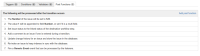
      3. Add Update Issue Custom Field post-functions to the transition:
        • The Number of the issue will be set to 123.
        • The value 1 will be appended to field Number, or set if it is a multi field. (tick append)
      4. Publish workflow
      5. Create a new issue
      6. Transition the issue from In Progress to In Review

      Actual Result

      The current value will be replaced instead of appended (updated value: 1):

      Expected Result

      The current value is appended with the value set in the second post-function (appended value: 1231)

        1. issuehistory.png
          issuehistory.png
          13 kB
        2. Screen Shot 2022-03-04 at 4.31.42 pm.png
          Screen Shot 2022-03-04 at 4.31.42 pm.png
          242 kB
        3. Screen Shot 2022-03-04 at 4.31.42 pm-1.png
          Screen Shot 2022-03-04 at 4.31.42 pm-1.png
          242 kB
        4. Screen Shot 2022-03-04 at 4.33.03 pm.png
          Screen Shot 2022-03-04 at 4.33.03 pm.png
          364 kB
        5. Screen Shot 2022-03-11 at 11.16.16 am.png
          Screen Shot 2022-03-11 at 11.16.16 am.png
          160 kB
        6. workflows.png
          workflows.png
          46 kB

            Assignee:
            Unassigned
            Reporter:
            Nur Asnida Hassan (Inactive)
            Votes:
            19 Vote for this issue
            Watchers:
            22 Start watching this issue

              Created:
              Updated:
              Resolved: