-
Type:
Bug
-
Resolution: Won't Fix
-
Priority:
 Low
Low
-
Component/s: Backup and Restore
-
1
-
Severity 3 - Minor
NOTE: This bug report is for JIRA Cloud. Using JIRA Server? See the corresponding bug report.
Description
When customer import a CSV file with a em dash (–) in the content, JIRA will treat it as invalid characters and import it as ? into the system. Em dash (–) is an utf8 character and is a longer dash symbol than the normal dash ( - ). However, JIRA CSV importer treat it as a non utf8 character when importing the issue content. For details, please refer to this documentation.
Steps to reproduce
- Create a CSV file which contains em dash (–) in description or summary field and save it.
- Login JIRA and use CSV importer to import the CSV file
- Ignore the warning message show during the import
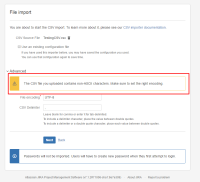
- Check the issue after successfully imported the issue

Expected result

Actual result

Workaround
Replace all the em dash (–) to normal dash ( - ) in the CSV file and import


- is related to
-
-
- Gathering Impact
-