-
Type:
Bug
-
Resolution: Won't Fix
-
Priority:
 Low
Low
-
Component/s: Dashboard - Dashboards & Gadgets
-
1
-
Severity 3 - Minor
NOTE: This bug report is for JIRA Cloud. Using JIRA Server? See the corresponding bug report.
Summary
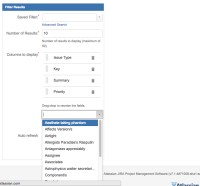
When configuring the filter results gadget, if there are many custom fields, the bottom of the dropdown menu can be shown off the bottom of the screen as in the screenshot below (JIRA 7.1.4 + Google Chrome)
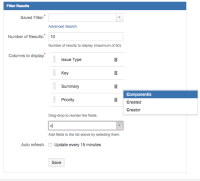
In older versions of the product, the Dropdown menu is shown next to the gadget as below in Google Chrome, or off the screen in Firefox:
- Overly long Dropdown:

- Strange menu positioning in JIRA 6.4:

- Strange menu positioning in JIRA 7.1.4 (even with no results):
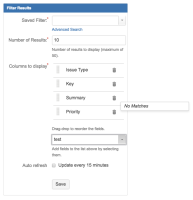

Environment
This issue can be replicated with Google Chrome Version 49.0.2623.112 and Firefox version: 45.
Steps to Reproduce
- Create a largish number of custom fields (say, 10 - 15)
- Create a new dashboard with a few gadgets,
- Add the Filter Results Gadgets to the bottom of the dashboard and try to configure it
- Attempt to add an additional column to display.
- Observe the positioning of the suggestions is inconstant.
- The weird positioning behaviour is inconsistently reproducible, but the likelihood of replication increases when the gadget is first added and positioned on the dashboard.
Expected Results
- If low on screen real estate, the dropdown shouldn't render so many suggestions that the list falls off the screen.
- The Dropdown should always show the full list, and be positioned under the dropdown text-field.
Actual Results
The location of the dropdown menu as shown is incorrectly sized and positioned as per the screenshots


- is related to
-
-
- Closed
-