-
Type:
Suggestion
-
Resolution: Unresolved
-
Component/s: Work Item - View (Internal developer use only)
-
None
-
0
-
3
NOTE: This suggestion is for JIRA Cloud. Using JIRA Server? See the corresponding suggestion.
I am creating this feature request on behalf of a customer:
It would be great if the "Issue Links" section in the 'issue view' page would always be visible even when there are no links configured yet.
Once at least a link has been added, then the section pear and we can easily add additional ones by simply clicking ont he "+" icon. When there are no links created yet, we always have to go into the button-menu "More" and then select 'Link'.
I am adding the following from a similar ticket to offer more context:
- Currently in Jira Cloud if we need to link a new issue i.e click on create linked issues to an existing or new issue we need to do the following.

1. Kindly make sure that in the "Project Issue Type Screen Scheme" every "create issue screen" and every issue type has the field "linked issue" added to it.
2. Once the linked issue field is added to your screen, please also make sure that when you create an issue >show your field has the linked issue enabled.
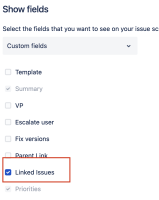


Suggestion:
It would be great if the linked issue worked without having custom the “linked issues” field on each create screen as “On-prem” environment. This will ease the user to not perform the steps and help in easily creating new linked issues


- is duplicated by
-
- Closed
- is related to
-
- Closed