-
Type:
Bug
-
Resolution: Unresolved
-
Priority:
 Low
Low
-
None
-
Affects Version/s: 7.2.0, 7.3.0
-
Component/s: Rule execution (engine)
-
Severity 3 - Minor
-
1
Issue
Automation rules using the Incoming Webhook trigger fail to run if the JSON payload provided by the webhook contains the data tag with just a string in it:
{
  "data": "Julien"
}
Notes
Note that the Payload received by the Automation rule is properly parsed if the data tag contains a map of data. In such case, the rule is properly triggered:
{
    "data": {
        "name": "Julien"
    }
}
Another note is that the same issue will happen if the payload contains the tag issues, as it is also a tag which is processed in a special way by Automation for Jira.
Steps to replicate:
- Configure an automation rule using:
- the When: Incoming webhook trigger
- the log action used to record the payload coming from the webhook, via the smart value webhookData

- Take note of the Webhook URL from that rule
- Open an app that can be used to send a POST request to the A4J rule webhook URL. For example, I'm using Postman
- Send a POST request to the webhook URL using:
- The webhook URL in the URL field
- the POST method
- the "content-type" header set to "application/json"
- the following payload:
{
  "data": "Julien"
}

Expected results
- A4J should come back to the client that sent the webhook with the 200 HTTP code:
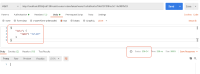
- The incoming webhook should be processed by the rule and the execution show be with the "SUCCESS" status in the audit log:
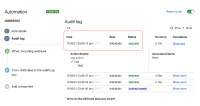


Actual results
A4J returns a 400 HTTP error with the following message:
{
    "warningMessages": [],
    "errorMessages": [
        "Can not instantiate value of type [map type; class java.util.LinkedHashMap, [simple type, class java.lang.String] -> [simple type, class java.lang.Object]] from JSON String; no single-String constructor/factory method (through reference chain: com.codebarrel.automation.api.webhook.IncomingWebhook[\"data\"])"
    ],
    "errors": {},
    "status": 400
}

Workaround
There is unfortunately no easy workaround. This bug comes from the fact that, by design, the Automation source code expects the data tag to come with the format below, and fails if data only comes as a string:
data: {
key: value,
key2: value,
...
}
The only way to work around this bug is to modify the format of the webhook payload which is sent to the Automation rule. This might or might not be possible, if this webhook is sent by using a 3rd party application.


- links to

- relates to
-
A4J-2721 Loading...