 Low
Low Issue Summary
An automation rule can be configured to run on a fixed rate schedule.
The rule is expected to run on this schedule based on the last execution time.
When a rule is updated, it's next execution is impacted by the change event, delaying the next rule execution.
Steps to Reproduce
- Install a vanilla instance of Jira Software Data Center.
- This was validated on Jira versions 10.3.0 (A4J 10.3.0), 9.4.29 (A4J 8.2.6).
- Create an automation rule as follows.
- Trigger: Scheduled
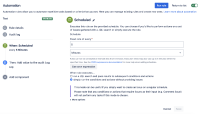
- Fixed rate of every 5 minutes
- When rule executes...: simply run the conditions and actions without providing issues
- Action: Log action
- Log message: Log
- Trigger: Scheduled
- Let the rule run on the schedule a couple of times.
- Update the rule by simply adding a description.
- Wait for the next rule execution.

Expected Results
The rule runs 5 minutes after the last time it was executed.
Additional note about the expected result:
This is the behavior on Jira Cloud, on which a rule update won't change the next schedule.

Actual Results
The rule runs 5 minutes after it was modified.

Workaround
Use a cron schedule instead of the fixed rate option.


- links to

- mentioned in
-
Page Loading...